
Once you've built quite a few AI co-workers, I think you do. An AI co-worker is one AI set up to own one job, the way you'd brief a person. Build a dozen of them, add thirty-odd scheduled tasks, and keeping on top of them all turns into a job of its own. The next step I'm taking in my own business, and the one I recommend to clients, is one autonomous agent acting as your chief of staff. You talk to it like a person, and because it knows all of your co-workers, it can take ownership of getting the work done.
What happens once you've built a dozen AI co-workers?
It gets really hard, and I found that myself. Claude was the engine room, but there was so much going on that it was very hard to keep on top of it. I'd have to go back in and find out which of my scheduled tasks was where. I've got all these folders and all these scheduled tasks, and I wouldn't necessarily have my bearings.
Claude had written the newsletters and the LinkedIn posts and the video scripts, and that was a lot. But I still had to use my own bandwidth to take ownership of my Monday content (Monday is my content day). And I had to be at my computer to do it. Okay, cool, what's the first thing I need to do? Find the LinkedIn post. Oh, actually that's not quite right, so how do I give it feedback when there's all this other stuff in there?
You look at your scheduled tasks and there's a million things, and they're all good. It just starts to feel a little bit like the tail's wagging the dog.
A few weeks ago I wrote about moving from AI as a helper to AI as a co-worker, and the chief of staff is what comes after that.
What does an AI chief of staff actually do?
It's basically how you'd treat a good executive assistant. You talk to it like a human and say, look, here's what we need to get done, you take ownership of it, and a good outcome looks like this. You can message it, send it a voice message, or pick up the phone and talk it through while you're driving.
And because it knows the whole team, you can hand it the outcome. You can say, it's the end of the quarter, so let's do the goal setting. Or, the marketing content needs doing every month, so you own that, because you know how we write and you know how we post. If it needs to, it'll set up another writing agent to get the bits done and delegate to it.
The way I'd describe the job is monitor, manage, set tasks, set goals and own it. You talk to one chief of staff, and it takes care of the rest of the team.
What changed when I handed over ownership?
My coach asked me a question about this. I'd said I wanted someone who could work directly in my AI Brain (a folder of files on my drive that explains how my business works, so the AI understands it) and on my website, without me having to touch it. He asked whether I was wed to that someone being a human. I said no. His point was that all I really wanted was someone to take ownership of it, so it wasn't my bandwidth getting chewed up all the time.
So I tried it. I gave an autonomous agent my Monday content and said, break it all down for me, we'll go piece by piece, and by the end of the day we need to have done two videos, three newsletters and two LinkedIn posts. It worked remarkably well. For the first time, the whole lot went out the door.
One of the other things I like about it in particular is that the one I'm using runs on its own computer. Mine doesn't need to be open. I log it in to the tools it needs on its machine, so it doesn't know the password, but it's logged in and can do the work while I'm away from my desk. I've written before that AI needs an AI Brain and a pair of hands, and this is the hands part running without me at the computer.
Do you still sign off on the work?
Yes, with all the same approvals. It does a screenshot of exactly what something will look like, shows it to me, I approve it, and then it moves on to the next bit. And it takes ownership of it. It keeps asking me and keeps making stuff happen until the day's work is done.
And even with video edits, I can record something, drop it in, and look at the edit while I'm waiting somewhere. I can pick up the phone and say, that's a pretty good video, but there's a couple of things, this, that and the other. It goes back for the next round of edits. When I say that's approved, it knows to take it to YouTube and flesh it all out from there.
Where would I start if I were building one?
I recommend building the co-workers first, one at a time. Install one, get the hang of it and get the value out of it before you add the next, because if you install them all at once you don't end up using any of them. Then, once you've got a dozen of them and thirty-odd scheduled tasks and there's a lot going on, that's when I'd add the chief of staff.
In a firm, I'd have the people who run the place share the one chief of staff. A partner can talk to it and hand over whatever comes to mind. The practice manager is the one most likely to be using it all day, delegating the bits and getting the daily and monthly reports back, so the partners can see what's happening if they need to. And the same chief of staff that runs the month-end can be told, we've got the capacity now, go and find us the next hundred clients.
This may well change next week, because the tools are moving fast, but right now this is what's working for me.
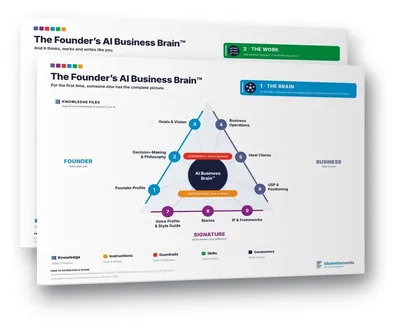
Want your AI co-workers working from how your business actually runs? The Founder's AI Brain™ Template helps you build an AI Brain: a folder of files on your drive that helps AI understand you and your business, so every co-worker, and the agent running them, starts on the same page. Free to download.
If you're putting AI on the program for a conference or a partners' day, the keynote and workshop formats are here. And if you're thinking about what happens when a senior person leaves, I've written about how no knowledge walks out the door once it's captured.
Frequently asked questions
What is an AI chief of staff?
It's an autonomous AI agent you talk to like a person, which knows all of your AI co-workers and takes ownership of getting work done through them. You give it the outcome and the deadline, and it works out who does what while keeping you across the approvals.
How is a chief of staff different from an AI co-worker?
A co-worker owns one job, like the newsletter or the month-end report. The chief of staff owns the whole team of them. It monitors them, manages them, sets their tasks and sets their goals, and it owns getting the work done, so you talk to one agent and it keeps track of the dozen.
When do you need one?
Once keeping track of your co-workers has become a job in itself. My rough marker is a dozen co-workers and thirty-odd scheduled tasks, at the point where it gets hard to keep track of what's running where.
Do you still approve the work?
Yes. Mine shows me a screenshot of exactly what something will look like before it goes anywhere, I approve it, and then it moves to the next piece. The approvals stay the same, and it keeps asking me and making things happen until the day's work is done.
Does it need your computer to be on?
The one I'm using runs on its own computer, so mine doesn't need to be open. I log it in to the tools it needs on its machine, so it doesn't know the password but can still do the work while I'm away from my desk.
Can a whole team share one chief of staff?
Yes, and in a firm that's what I'd recommend. The partners can hand it whatever comes to mind. The practice manager uses it day to day and gets the daily and monthly reports back, so the partners can see what's happening if they need to.