If you're using AI as a helper, you're the one carrying documents into a chat window and carrying the answers back out again, and you're the middle person on every turn of it. With a co-worker, it does the work on your computer, where it can actually have access to entire folders, so it reads how you've done the job before and gets on with the next one. So let me just share with you how to think about that.
Why does AI still feel a bit clunky when you're already good at it?
If you're one of those organised professional services firm owners, and you've got a whole server or drive of your successful projects and deliverables and templates and resources, and you're finding that AI is still just a little bit clunky, then this is the bit I'd look at.
Now most people use ChatGPT or Claude at the moment. I love Claude. And what they do is they talk to it on their computer, attach a document, say read this and make it like this, then add documents into the chat and take documents back out of the chat. They get excellent results. Most people think that is mind-blowing stuff, and it is.
That process is also where most people who are fairly confident using AI get to. And then they sort of go, all right, well, how do other people use it?
What's the difference between an AI helper and an AI co-worker?
With a helper you're giving stuff to it, waiting for its response, giving it more stuff, waiting for its response again, and you're the middle person on every single turn.
So what the difference is is having Claude do work on your computer, where it can actually have access to entire folders of work. So rather than you being the middle person and copying documents into the chat, you're actually saying: Claude, here's a folder with all of my templates, and here's how I've done work in the past.
So that's the big shift. That's what I help clients do, and it's what I cover in an AI keynote or workshop. I shape it for whichever profession is in the room, whether that's a conference or a firm's own PD day.
This is the other half of something I wrote about in August. If you've got a very capable AI brain that knows everything about you and knows all that context, but you never actually give it any work to do, it's just a very expensive online filing cabinet. Your folder of results is one place that brain can come from, and I like to do a bit of both, the talking and the files.
What do you actually put in the folder?
There are two things, and they do different jobs. The first is your folder of results. Have Claude go into that folder, have a read through the proposal and the deliverables that you produced, and understand that entire process.
The second is the raw material for the job in front of you. Here's some of the requirements, here's some of the raw data, here's some of the reports, council things, whatever it is that you'd normally read and process and do work with.
Then you say: Claude, here's what you need to aim for, apply it to this type of data, and let it do its thing. It's smart enough to see all the nuance and all the steps and all the detail in stuff you've done before, and then apply it to stuff you need to do now. And not only that, it's smart enough to design it and produce it and package it in a way that matches your branding, matches your style guide, and looks as good, if not better, than the work you'd produce yourself.
What about confidentiality and client material?
Subject, of course, to privacy, confidentiality, all those things that you know you need to factor in as a professional services person, but that's for you to consider.
I've written about the practical guardrail before. Redact any information, financials, ABNs and privileged information, unless you're on the enterprise version of products like Claude, where it's all sandboxed and you're compliant. Then, on something complex, ask AI to analyse it rather than recreate it. I'm not a lawyer, so do check with your in-house counsel and compliance people before you start.
What does it look like when it lands?
In his first week, a solo specialist consultant pointed AI at his own Brain and proposal template, and the first draft of a 20-page proposal went from about three hours to about 30 seconds. That was a first draft, not perfect, and the three hours is his own estimate.
Nearly half of proposal and RFP teams using AI report faster turnaround and better quality, in Loopio, April 2026.
Now, a folder on its own is passive, and that's an argument I've made at length. What keeps working when a senior person leaves is the knowledge plus the instructions and the guardrails around it, and the folder is only one part of that.
Where do you start?
You can do a bit of both, but unpack the thinking first. So just talk to your computer and tell it a little bit about yourself, your ideal client, your business, your products and your services. Then you start with one job.
So pick the piece of work you produce most often, find two or three of the best examples you've already delivered, wherever they happen to be sitting, put them in one folder with the raw material for the next one, and then ask for that next one.
You'll find out two things quickly. You'll see how good the output is when it's working from the stuff you've done before, and you'll also see what it couldn't find, which is worth knowing early.
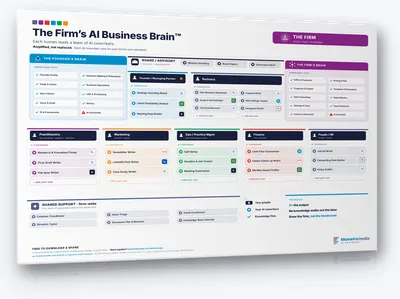
You have probably worked out how AI helps you. The Firm's AI Business Brain template is the one-page map for giving everyone else in the firm the same thing, every role and the AI coworkers under it. Free to download.
Frequently asked questions
How is an AI co-worker different from using AI in a chat window?
With a helper you're giving stuff to it, waiting for its response, giving it more stuff and waiting again, so you're the middle person on every turn. With a co-worker, it does work on your computer, where it can actually have access to entire folders, so it reads how you've done the job before and produces the next one.
Why does AI feel clunky even when I'm confident using it?
Because it's working from the documents you hand it one at a time. When you attach documents into a chat you get excellent results, and that's where most people who are fairly confident using AI get to. After that, you give it access to the folder.
What should I put in the folder?
There are two things. Your folder of results, which means the proposal, the deliverables and the reports that actually went out. And the raw material for the job in front of you, which is the requirements, the raw data, the reports and the council things you'd normally read and process yourself.
Is it safe to give AI access to client folders?
That's for you to consider, as a professional services person with privacy and confidentiality obligations. Redact any information, financials, ABNs and privileged information, unless you're on the enterprise version of products like Claude, where it's all sandboxed and you're compliant. I'm not a lawyer, so do check with your in-house counsel and compliance people before you start.
How long does it take to see a result?
It can be the first week. A solo specialist consultant pointed AI at his own Brain and proposal template in week one, and the first draft of a 20-page proposal went from about three hours to about 30 seconds. That was a first draft, not perfect, and the three hours is his own estimate.
Do I need to tidy up my files first?
You can start with one job instead. Pick the piece of work you produce most often, find two or three of the best examples you've already delivered, and put them in one folder with the raw material for the next one. You'll see what AI couldn't find, which is worth knowing early.